Do too many plugins slow down WordPress? Open any “speed up WordPress” article and you’ll hit the same answer in the first three bullets: you have too many plugins. Deactivate some. Fewer plugins, faster site.
It’s repeated so often it’s become a reflex. Slow site? Count your plugins.
So I tested it. I benchmarked 55,202 plugins* from the WordPress.org directory — each one installed and activated in a clean, isolated WordPress container, with the homepage’s load time measured before and after. If the “too many plugins” rule were true, you’d expect most plugins to add real, measurable weight.
They don’t. The median plugin added 0 milliseconds to the homepage. Not “a little.” Zero, within measurement noise. The number of plugins on your site is, for most plugins, almost irrelevant to how fast it loads.
That needs caveats, and I’ll give them honestly below — because the myth survives for a real reason. But the headline holds: plugin count is the wrong thing to measure.
What “too many plugins” gets wrong
The mental model behind the myth is that each plugin is a fixed tax. Twenty plugins, twenty taxes, slow site. Cut to ten, cut the tax in half.
That’s not how WordPress works. A plugin that isn’t doing anything on a given request costs almost nothing on that request. A backup plugin does its work on a schedule, not when a visitor loads your homepage. An anti-spam plugin runs when a comment is submitted. A migration tool runs once, by you. None of them touch the front end of a normal page load, so none of them slow it down — no matter how many you stack up.
The cost of a plugin isn’t “it exists.” The cost is “it runs code on this specific request.” Most don’t.
What I measured (and what I didn’t)
Every plugin got identical treatment, no human in the loop:
- Spin up a clean, isolated WordPress install (WordPress 6.9.x).
- Record the homepage’s time-to-first-byte (TTFB) with no plugin active.
- Install and activate the plugin.
- Record TTFB again. The difference is the plugin’s cost.
One thing to be clear about, because it’s the honest limit of this data: I measure a freshly activated, unconfigured plugin on a default site. This is the cost of merely having the plugin active — not the cost once you’ve configured it and built your site around it. A page builder rendering a page you’ve packed with widgets will cost far more than its idle benchmark. WooCommerce on a store with 10,000 products is a different animal than WooCommerce sitting on a blank install.
So read the result precisely: installing and activating more plugins does not, by itself, slow your front end. What you do with a few of them is a separate question.
The result: the median plugin costs nothing
Here’s the homepage TTFB delta across all 55,202 plugins:
| Measure | Homepage TTFB added |
|---|---|
| Median plugin | 0 ms |
| 90th percentile | 10 ms |
| 99th percentile | 25 ms |
| Worst single plugin | 40,069 ms (a broken outlier) |
And the distribution is the real story:
| Homepage cost | Plugins | Share |
|---|---|---|
| 10 ms or less | 50,106 | 90.8% |
| 11–50 ms | 4,787 | 8.7% |
| 51–100 ms | 113 | 0.2% |
| 101–500 ms | 119 | 0.2% |
| Over 500 ms | 77 | 0.14% |
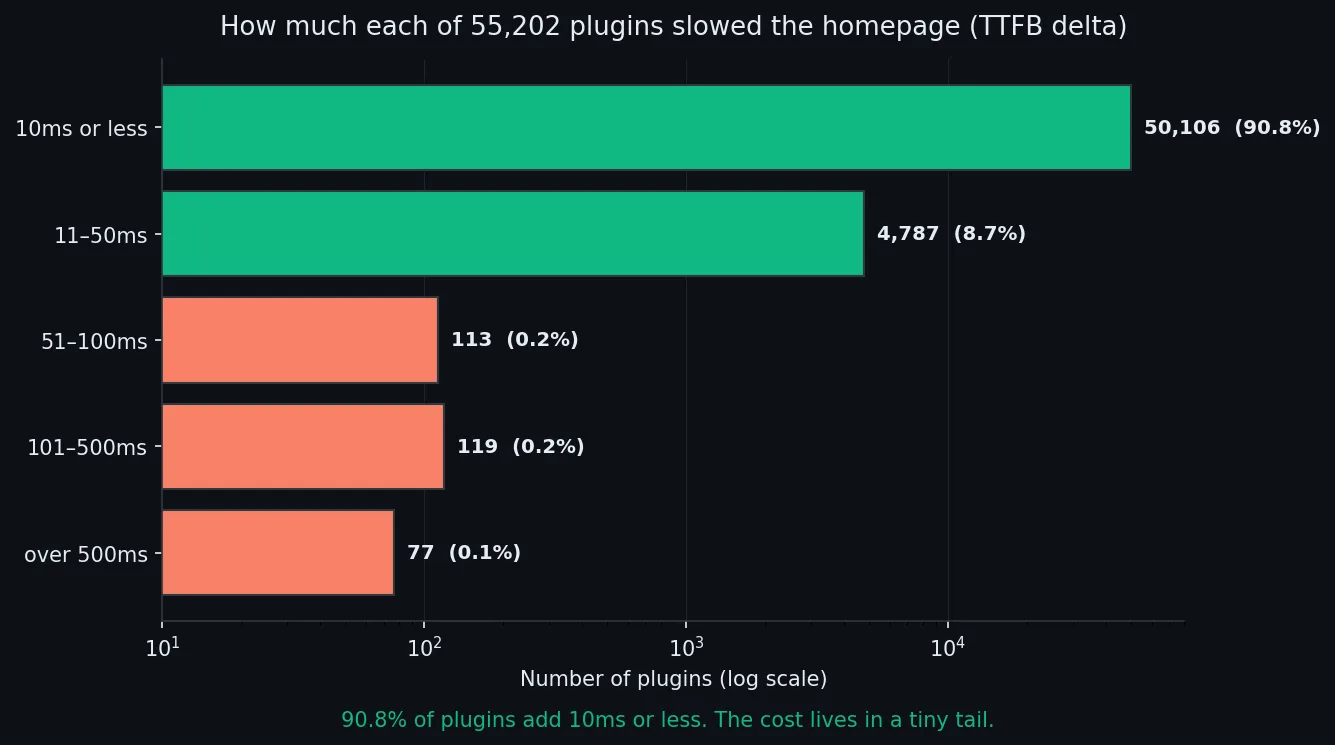
Nine in ten plugins add 10 milliseconds or less. Nearly 59% land within ±5 ms of zero — statistically indistinguishable from not having them at all. Memory tells the same story: the median plugin added 0 KB to the homepage’s peak memory, and only 64 of the 55,202 added more than 5 MB.
The plugins that genuinely hurt — the 196 that add more than 100 ms, the 77 that add more than half a second — are real, and they’re worth hunting down. But they’re 0.36% of the directory. You don’t find them by counting. You find them by measuring.
It’s not just the homepage, either. In the admin dashboard the median plugin also added 0 ms (90th percentile 11 ms), and the same at activation. The “death by a thousand plugins” picture just isn’t in the data at the median.
So why does the myth refuse to die?
Because it’s almost pointing at something true. Three real things hide behind it:
-
The heavy tail is real and it’s brutal. That worst-case plugin added 40 seconds. A few hundred plugins hook into every single request — running queries, calling external APIs, loading large libraries on
init. If your slow site happens to be running two or three of those, deactivating plugins will fix it. You just got lucky about which ones you removed. Finding the actual culprit is faster than deactivating at random. -
Configuration and usage, not the plugin itself. A page builder is cheap on a blank page and expensive on a page you’ve packed with widgets. That cost is real, but it’s your page, not the plugin’s mere presence. Counting plugins won’t surface it.
-
The genuinely broken ones. In a separate benchmark of plugin quality, I found roughly 1 in 16 plugins couldn’t even activate without erroring. Install one of those and “remove a plugin to fix the site” becomes literally true — but the lesson is “don’t install broken plugins,” not “install fewer.”
Every one of those is a reason to be selective, not a reason to be minimal.
What actually slows your site
If plugin count is the wrong metric, here’s where the time actually goes — roughly in order of how often it’s the real problem:
- A handful of heavy plugins. Not all of them. Two or three. Profile your site and you’ll usually find the weight concentrated in a few.
- No page caching. This dwarfs almost everything else. A cached page skips PHP and the database entirely.
- Slow hosting and no object cache. Redis or Memcached for the database round-trips, and a host that isn’t overselling its CPUs.
- An under-tuned
wp-config.phpand a bloated database full of revisions, transients, and exhausted memory.
Notice what’s not on that list: “the number 14 being too high.”
Tired of guessing which plugins are slowing your site down? That’s why I built WP Multitool. It profiles every plugin’s real load cost, finds the slow queries, and trims autoload bloat from one dashboard. It’s a paid plugin — no free-tier games — but it saves me the afternoon I used to spend profiling by hand.
What to do instead of counting plugins
- Stop deactivating at random. It’s how the myth got started, and it occasionally works by luck. Measure first.
- Find your heavy few. Point a profiler at a slow page and it will show you which plugins actually run on that request and how long each one takes. WP Multitool’s Find Slow Callbacks does exactly that — give it any URL and it times every hook and callback, then names the plugins or themes slowing it down. The answer is almost always a short list.
- Judge a plugin before you install it, not after your site is slow. Check the last-updated date, the active installs, and the recent reviews.
- Fix the fundamentals first — caching, hosting, object cache. They beat any amount of plugin-pruning.
The numbers behind this post come from the MakeWPFast benchmark dataset: every active plugin on WordPress.org, installed and measured in isolation. You can query a given plugin’s measured cost through the Benchmark API, or browse the full plugin index. And if you’d rather see those scores where you actually make the decision, WP Multitool drops a Plugin Performance Score column straight onto your WordPress plugins page — each plugin’s benchmark score, memory use, and database queries, pulled from this same dataset — so you can spot the heavy ones without leaving wp-admin.
The takeaway isn’t “install everything.” It’s that “too many plugins” is lazy diagnosis. Ten well-built plugins will outrun three bloated ones every time. Stop counting. Start measuring.
* About the 55,202. The WordPress.org directory holds more plugins than that. This figure counts the ones that installed, activated cleanly, and returned a valid homepage measurement — the only plugins whose front-end cost can honestly be measured. Several thousand more were tested but couldn’t be benchmarked at all, because they failed to even activate: broken packages, fatal errors, missing dependencies. Those are a separate story, which I dug into in We Tried to Run Every Plugin on WordPress.org. Excluding them here is deliberate — you can’t measure the load time of a plugin that won’t load.
Update: a Redditor challenged the claims in this post, so I installed 223 plugins on one 256 MB box to settle it. Here is what actually broke.
Join developers and agency owners who get backend optimization strategies, tool releases, and deep-dive guides.
No spam. Unsubscribe anytime. I respect your privacy.